

When it comes to searching and filtering products in WooCommerce, the core plugin ships with the basics: a price filter, an attribute filter, and a product categories widget, among a few others. For small stores with twenty products and two categories, that’s enough. Add more products, though, and it stops being useful.
Shoppers can’t narrow a 1,000-product catalog with a single dropdown. The default widgets don’t communicate in a way that resembles modern faceted search.
This Search & Filter Pro review covers what’s in the free version, what Pro adds, and how the plugin holds up on a test store with 1,000 products using our Shoptimizer WooCommerce theme.
Search & Filter Pro is built to be the go-to option when the default stops being enough. It combines an AJAX-driven filtering engine and an indexed product search in one plugin, built on a query editor, a dedicated Gutenberg block category, and an indexer designed to keep multi-attribute filtering on large catalogs from hurting Core Web Vitals.
Why WooCommerce Stores Often Need More Than the Default Filtering

The case for replacing WooCommerce’s default filtering gets stronger as your catalog grows. The category dropdown is fine until you have more than about ten categories. The attribute widget works until you want to combine three attributes and a category. The price filter assumes shoppers know how much they want to spend before they start looking.
Search & Filter Pro adds the pieces that the built-in functionality is missing. Filters can be set to hide options that would return zero results, narrow results in real time as a shopper toggles options, and return only the variation combinations that actually exist.
Performance is the other half of the case. A shop page that feels fast can slow down once shoppers start filtering, because each refinement runs another query against the catalog. If you care about load times (and you should), pairing a performance-focused theme like Shoptimizer with a filter plugin that only loads its code on the pages that use it keeps the speed advantage where it counts.
What’s in Search & Filter Free vs Pro
The free version available in the WordPress Plugin Directory provides the foundation for improved WooCommerce product searching and filtering.
The Query Editor lets you tie filters to one of five location types (Dynamic, Single Post/Page/CPT, Archive, Search Global, WooCommerce Shop), and a dedicated Gutenberg block category puts one block per field type into the inserter.
The blocks in the free version cover Text Search, Select / Checkbox / Radio / Button Choice, Date Picker, and the Submit / Reset / Sort / Per Page controls.
Smart Asset Loading keeps the plugin’s JS and CSS off pages that don’t actually have filters, and accessibility features (aria-labels, skip links, screen reader announcements) are baked in at the query level. For a small store with one or two simple filter sets, the free version should be enough.
Upgrading to the Pro version unlocks the biggest benefits. With Pro, the variation-aware Indexer only returns combinations that actually exist, which matters in any store that sells variable products. Live Search makes filtering AJAX-driven with full History API URL sync so that shoppers can press backwards and forwards in the browser to instantly load previous results fields state.
Dynamic Fields and Options hide filter values that would return zero matches. Combined with tri-state checkboxes, hierarchical auto-select, and inline result counts, you get a more refined filter UX than the default WooCommerce widget.
Upgrading to Pro also unlocks the range fields (slider, select, radio), the Current Selection and Load More control fields, deep ACF integration with repeater and flexible content support, and page builder integrations for Elementor, Beaver Builder, Bricks, and GenerateBlocks. WPML and Relevanssi integrations are available, too.
Pro also includes Enhanced Search, the plugin’s new indexed search engine, which we cover below, and the Large Query Optimizer, which tunes server-side queries for very large catalogs.
Setting Up Search & Filter Pro on Shoptimizer
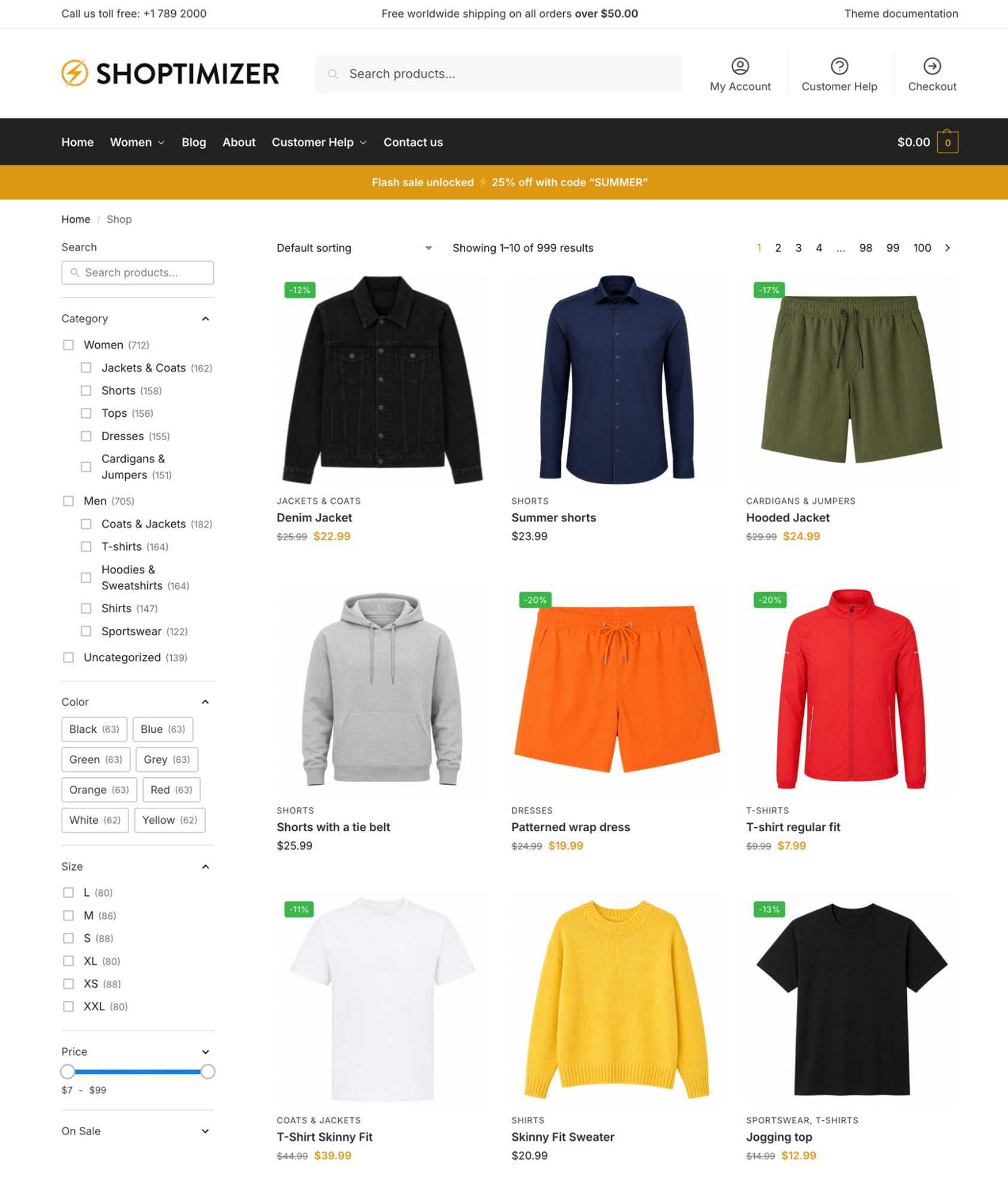
For this Search & Filter Pro review, we built a working filter set on a test WooCommerce store using the Shoptimizer theme with 1,000 products, modeled on the kind of faceted sidebar you’d see on a retailer like Nike or Patagonia: search at the top, active-filter chips, then category, color, size, price, and an on-sale toggle.
Creating the Query and Defining Fields
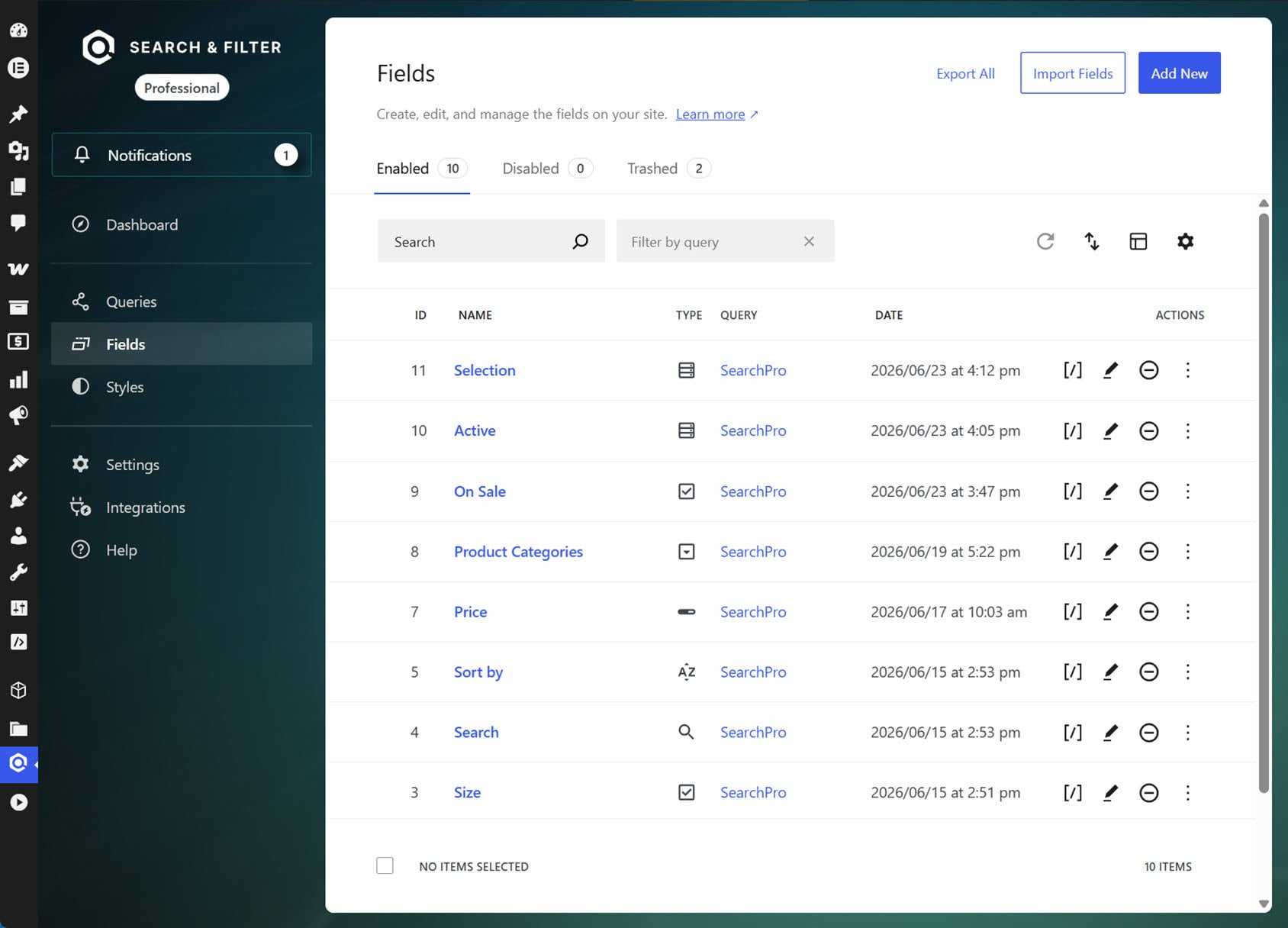
When getting started with Search & Filter Pro, the first step is creating a Query (Search & Filter → Queries → Add New).
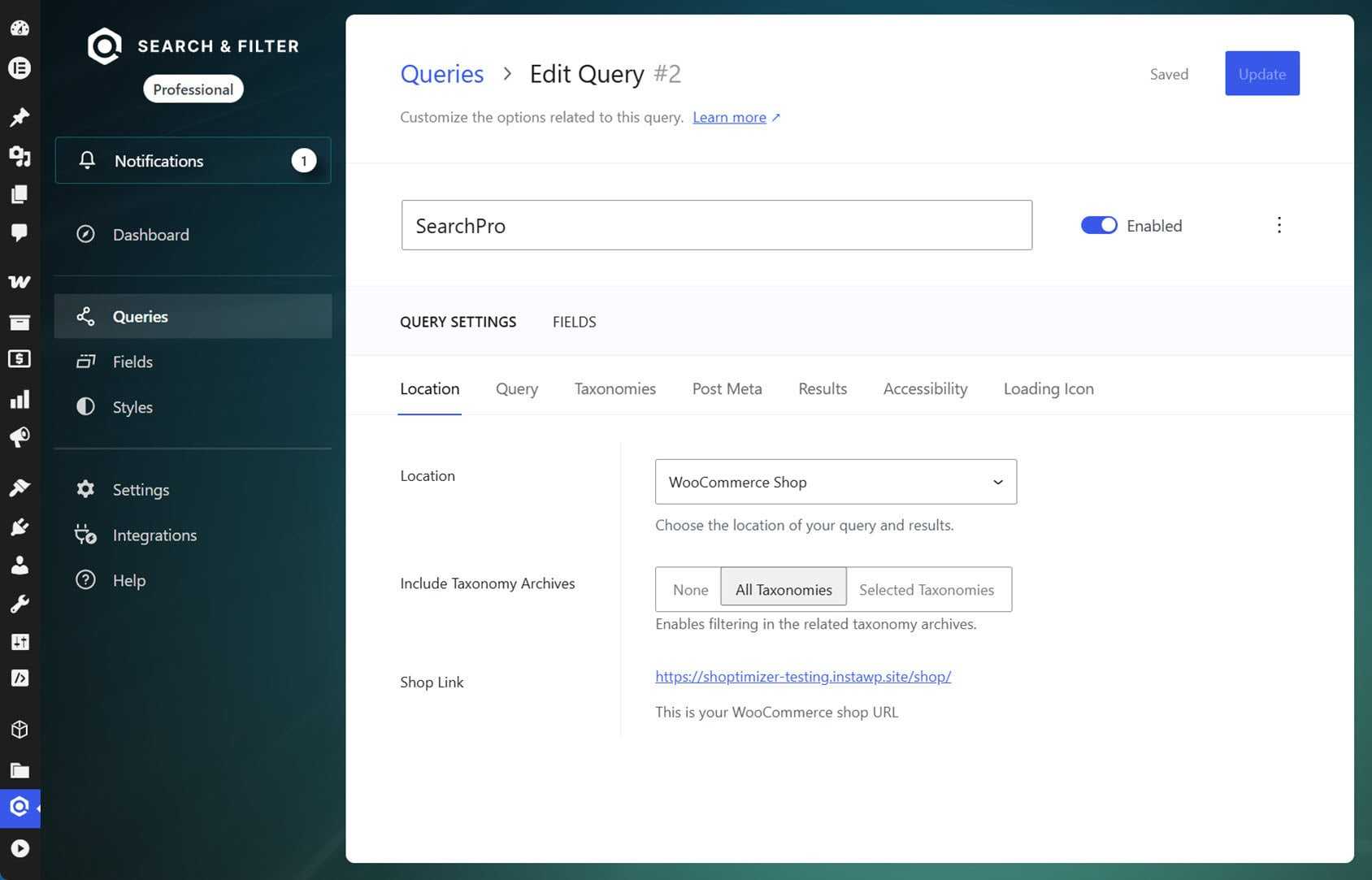
Under Query Settings, set Location to “WooCommerce Shop” so the query targets the shop archive, then choose which taxonomies to include. For the test site, we used product categories plus the color, size, and materials attributes.
Fields are then defined at the query level under the Fields tab. For each field you add, you can pick what it filters on and how it renders. For example, this could be Color as a button group, Price as a slider, and On Sale as a single checkbox. To display a field on the page, you add a Load Field block and point it at the field you defined.
The advantage is that you define each field once in the plugin dashboard and reuse it throughout the site. Just be sure to add the Load Field block to the page rather than the field-type blocks like “Checkbox – Choice Field,” or you’ll create one-off fields instead of referencing the ones you defined.
Building the Filter Sidebar
Shoptimizer’s shop sidebar uses the block widget editor, but this can be toggled (Appearance → Customize → Layout → General → Disable block editor). With that toggle off, Search & Filter’s Load Field blocks drop straight into the sidebar through the Customizer.
With Live Search enabled for the AJAX layer, the fields were placed in the test store’s sidebar through the Customizer widget area using Load Field blocks.
For the test filter, we followed the layout conventions of popular online retailers: search first, then an active-filters block (the Selection control field, which shows applied filters as removable chips), followed by category, color, size, price, and on sale, with the sort control at the bottom.
One limitation worth knowing about is that the current version’s Choice field renders as a checkbox, radio, select, or button, with no native color swatch.
For the test store, Button inputs were used for Color and Size, which render as clickable pills, similar to the button styling on the Nike and Patagonia stores. If you want literal color circles, you need custom CSS at the theme level. The plugin’s built-in Styles editor currently handles color choices only, not swatch shapes.
We also enabled the collapsible toggle on each field so sections expand and collapse on click. This is a popular approach, since it keeps a long filter list manageable on smaller screens.
Adding Filters Above the Product Grid
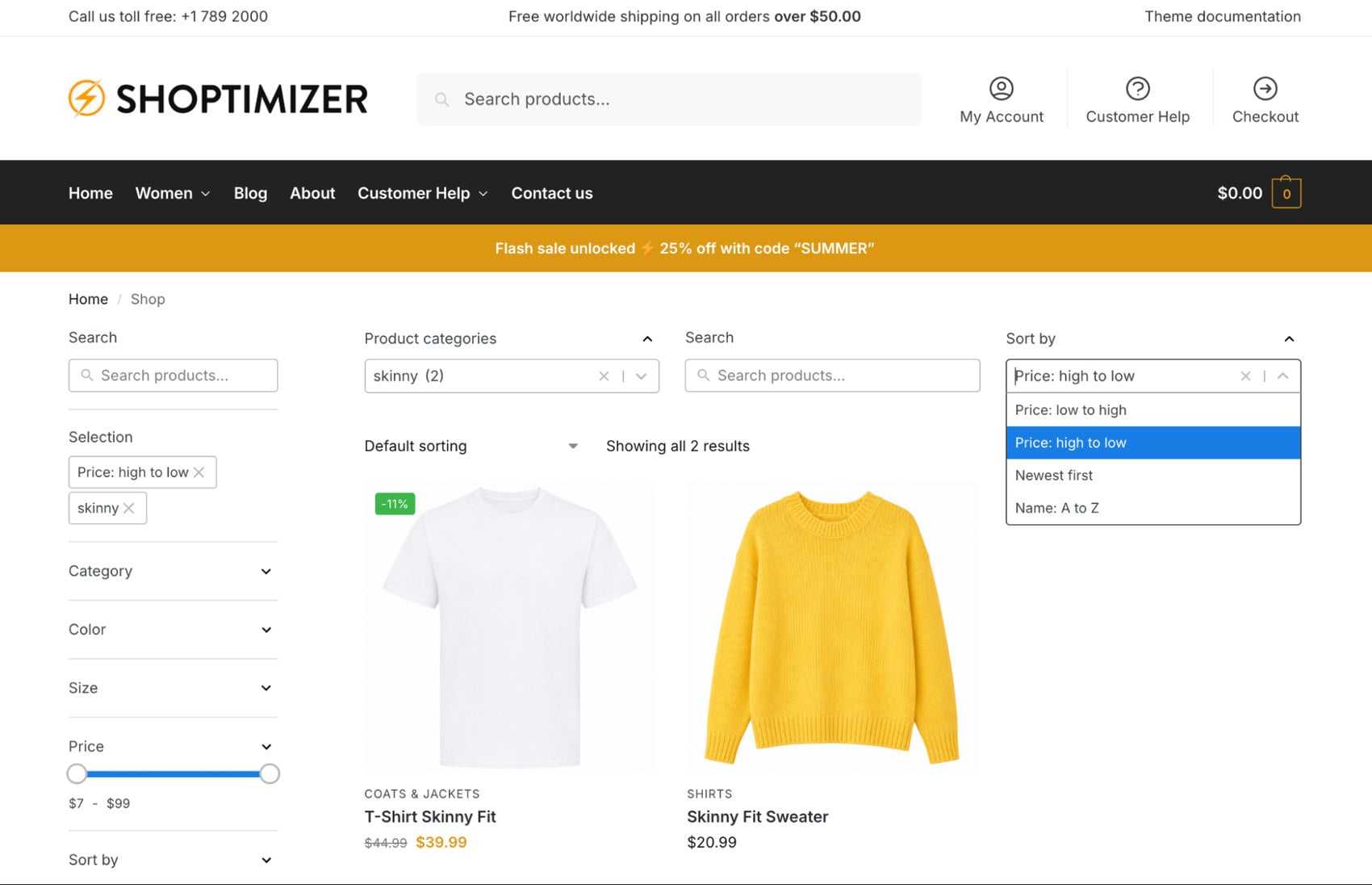
Adding the filter fields to the sidebar isn’t the only option. The same Load Field blocks can be added to a row above the product grid, which suits stores that want filters laid out horizontally with a full-width grid below.
To do this, we placed product categories, search, and sort in a three-column row at the top of the archive. It works as a secondary control strip alongside the sidebar, or as the primary layout on its own.
Filtering on Category Pages
By default, the filter query only runs on the main shop page. To make the same filters work on category archives like Men or Women, open the query’s Location tab and set Include Taxonomy Archives to All Taxonomies (or Selected Taxonomies, then choose Product Categories).
With that on, filtering on a page like /product-category/men/ stays scoped to that category instead of redirecting to the full shop.
Testing the New Search Engine
Filtering is only half of the plugin now. In January, v3.2.0 added the search side of Search & Filter: a full-text product search that runs through the same index as the filters, so searches stay fast as the catalog grows. It’s currently an opt-in toggle (Settings → Beta Features → Enhanced Search).
The plugin is now a search and filtering tool, where most filter plugins leave search to a separate plugin like Relevanssi or SearchWP.
What makes it different from the standard WordPress search is the data it can see. A search field can draw on any combination of data sources. This includes post titles and content, taxonomies, custom fields, and the WooCommerce options, such as categories, tags, brands, attributes, and SKUs. For this Search & Filter Pro review, we combined product titles with product categories and the color and size attributes.
The difference showed up immediately on our test catalog. Not a single product title contains the word “hoodie,” so searching for it with a title-only setup returns nothing. With categories added as a data source, the same search returns all 164 products in the Hoodies & Sweatshirts category.
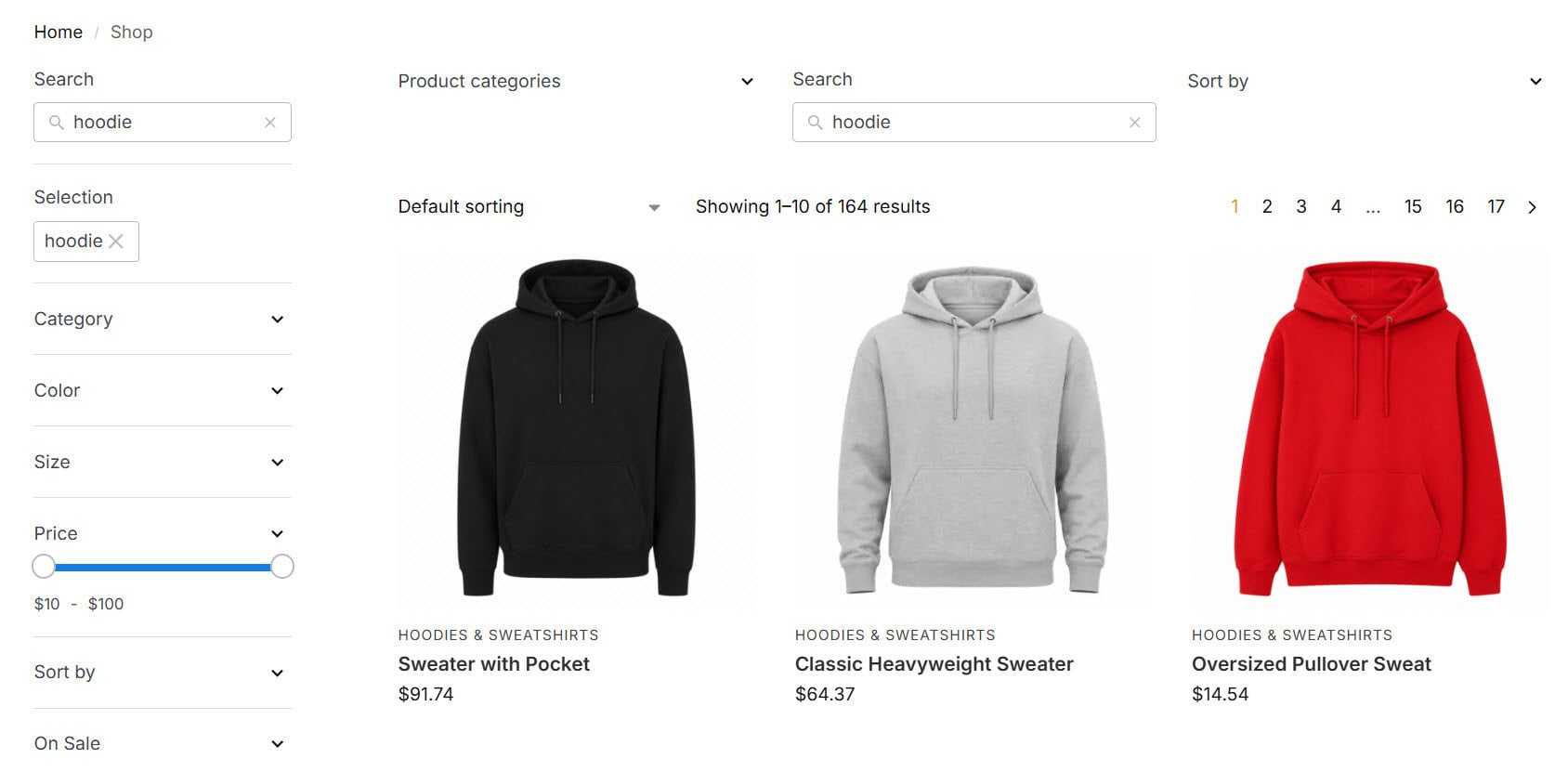
Typo handling is built in, too. Searching “hoody” returns the same 164 results, and “jaket” still surfaces the jacket products instead of a no-results page. The release notes list BM25 relevance scoring plus stemming and phonetic matching, with support for 14 languages.
Performance on a Configured Store
Code Amp rebuilt the plugin’s indexer for v3.2.0 in January 2026. Their published benchmarks are impressive: a search engine ten times faster than the previous generation, an indexer that can rebuild ~10,000 posts in a couple of minutes, and a 50% reduction in database queries. Stores that were hitting performance ceilings around 20,000 posts can now scale to 50,000 or more.
On our test install (a WooCommerce store built using Shoptimizer with 1,000 generated products and a five-field filter covering Sort, Search, Size, Color, and Category), a typical filtered shop page generates about 220 database queries with total query time around 0.06 to 0.08 seconds, a 92% object cache hit rate, and roughly 29MB of memory per request.
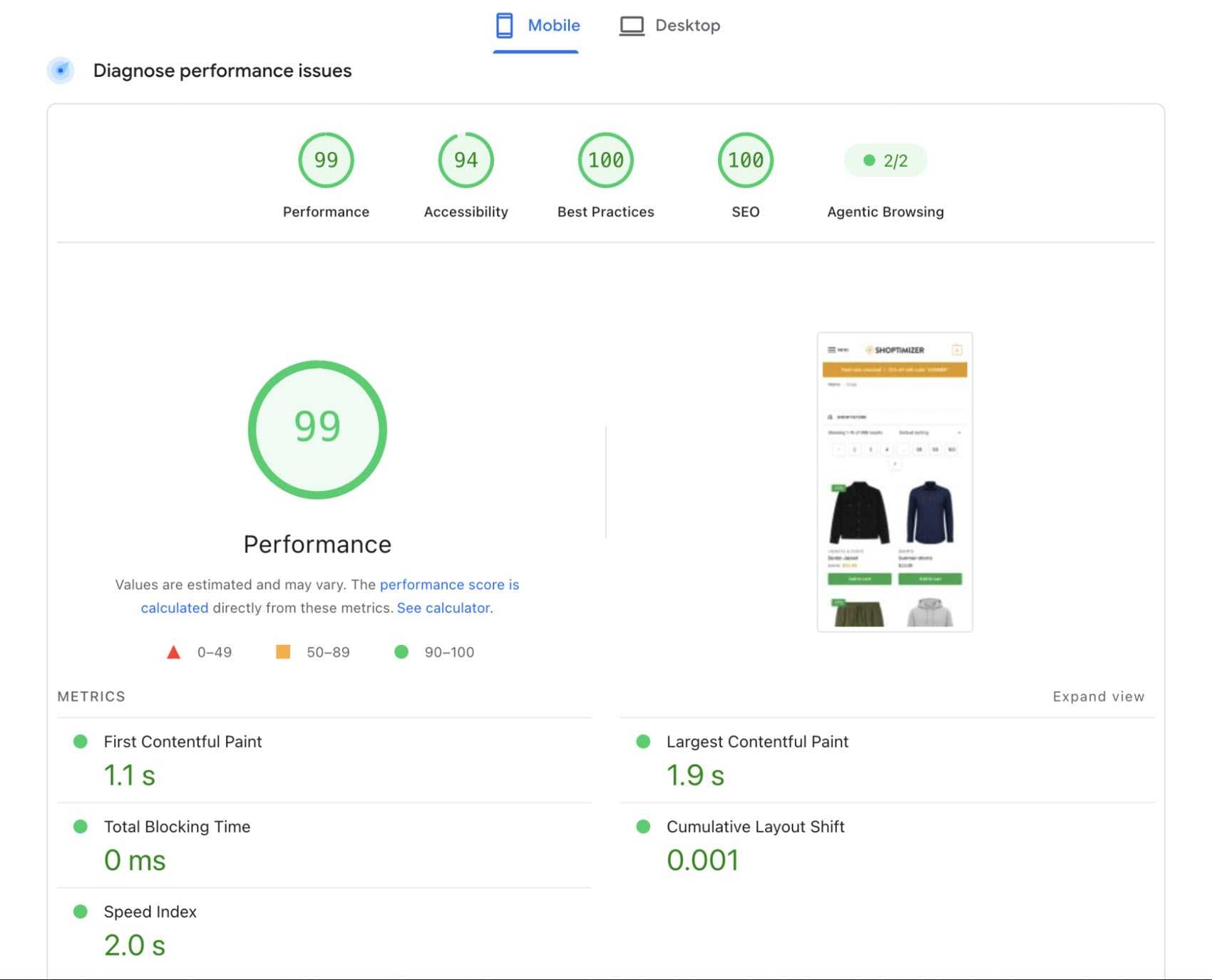
On the shop page we used for this Search & Filter Pro review, PageSpeed Insights returns a fantastic Mobile Performance score of 99/100, with an LCP of just 1.9 seconds, Total Blocking Time at 0 milliseconds (Smart Asset Loading keeping JS off the critical path), and Best Practices at 100.
Live Search updates results without reloading the page, and combining filters didn’t add noticeable delay. Filtering by category alone and by category plus color took about the same time, so the Indexer isn’t re-running the whole query for each extra option. At 1,000 products, the database has plenty of headroom.
Search & Filter Pro Pricing
Search & Filter Pro is sold on a yearly subscription with three tiers:
- Starter is $49/year for a single site.
- Professional is $99/year for three sites with priority support.
- Developer is $219/year for unlimited sites with priority support.
All three tiers include a 30-day money-back guarantee and one year of plugin updates, and licenses auto-renew unless canceled.
Starter sits at the lower end of the WooCommerce filter plugin pricing range, and the Developer tier is a good value if you run more than three stores.
If you’re using the free version for basic taxonomy filtering, then upgrading to Starter gets you AJAX live search, the variation-aware Indexer, faceted search, and the range slider field.
What’s Next on the Search & Filter Pro Roadmap
Search & Filter Pro is built by Ross Morsali of Code Amp, who’s been shipping updates to it for over a decade. The v3.2.0 rebuild, a search engine ten times faster than the last, shows where his priorities sit, and that focus on performance is a good sign for where the plugin goes next.
Public plans for the rest of the year include Phase 3 of the Styles system and a dedicated v2-to-v3 migration tool arriving in v3.3.0.
Beyond that, Code Amp is working on tighter integration with WooCommerce’s new block layouts via the Interactivity API and Abilities API support that will make filters configurable by AI agents through MCP.
That last one is important as WordPress 7.0 makes AI-driven plugin interaction a core capability, and stores looking to be cited by AI search engines will want filters that AI agents can actually understand and use.
Is Search & Filter Pro Worth It?
After this review, we’d recommend Search & Filter Pro for WooCommerce stores that have outgrown the default filtering and search: variable products, multi-attribute catalogs, custom-field-driven product data, or a serious accessibility commitment all push you past what the built-in widgets can handle.
The variation-aware Indexer alone justifies the Pro upgrade if you sell anything with options, the AJAX live search and faceted hide-when-empty behavior pay off when it comes to improving store UX, and the v3.2.0 indexer rebuild has the biggest impact on large catalogs where Core Web Vitals would otherwise start to suffer.
However, if you have fewer than 20 products and a single attribute axis, the default WooCommerce widgets, as basic as they are, would suffice.
Search & Filter Pro pairs especially well with a performance-focused theme like Shoptimizer, but it works on any WooCommerce store. Consider starting with the free version, get a query and a filter form configured, then upgrade to Starter when you want the AJAX layer.
Find out more about Search & Filter Pro.
Search & Filter Pro FAQs
Does Search & Filter Pro Work with WooCommerce Variations?
Yes. The Pro Indexer only returns variation combinations that actually exist, so a shopper picking “blue” and “medium” sees products with that specific combination rather than every blue product or every medium product in the catalog.
Does Search & Filter Pro Improve WooCommerce Product Search?
Yes. The Enhanced Search engine (under Settings → Beta Features) indexes any combination of data sources, including titles, categories, tags, brands, attributes, custom fields, and SKUs, and handles typos and spelling variants. On our test store, a search for “hoodie” matched all 164 products in the Hoodies & Sweatshirts category even though no product title contained the word.
Will Search & Filter Pro Slow Down a WooCommerce Store?
The free version has Smart Asset Loading, which keeps the plugin’s JS and CSS off pages that don’t actually have filters. Pro adds an indexer designed for catalogs at scale. On the 1,000-product Shoptimizer install we used for this Search & Filter Pro review, the database wasn’t anywhere near being the bottleneck.
Do I Need to Write Code to Use Search & Filter Pro?
No. The plugin ships with a dedicated Gutenberg block category (one block per field type) that drops directly into the block editor. Shortcodes are still available for non-block themes.
What’s the Difference Between the Free Version and Pro?
Free covers the Query Editor, basic field blocks, taxonomy filtering, Smart Asset Loading, and the accessibility features. Pro adds AJAX live search, the variation-aware Indexer, Enhanced Search, faceted search, range sliders, advanced query controls, ACF deep integration, page builder integrations, and WPML.
Will Search & Filter Pro Work with Shoptimizer?
Yes. The v3 architecture works with any FSE or classic shop page, including Shoptimizer’s. For this Search & Filter Pro review, we tested it on a demo store using Shoptimizer with 1,000 products and walked through the setup above.
Can I Filter WooCommerce Products by Price Range?
Yes. The Pro range slider field has built-in WooCommerce price support. Set the field’s Data Type to WooCommerce and Data Source to Price; the slider will auto-detect the minimum and maximum values from your catalog. No custom field mapping required.




 Supercharge your shipping setup for WooCommerce
 Keep Captiva up to date with the Envato Toolkit
 Speed up Loading Times with EWWW Image Optimizer
 Ajax Filters for WooCommerce