

In this WooCommerce hosting review, we test Cloudways’ entry level managed plan, which starts at $11 per month on DigitalOcean, to see how a real WooCommerce store performs. Cloudways bills pay as you go, so you only pay for the resources you use and can scale up at any time.
Cloudways, now part of DigitalOcean, is a managed cloud hosting provider that suits WooCommerce powered websites. It offers a performance tuned hosting stack, free Let’s Encrypt SSL certificates, and an optional Cloudflare Enterprise CDN for stores that sell globally.
The entry DigitalOcean Standard plan we test offers:
- 1 GB RAM
- 1 core processor
- 25 GB storage space
- 1 TB bandwidth
A Premium 1 GB tier with faster NVMe storage is available for a few dollars more.
We’ll start with a brief overview of Cloudways’ managed hosting service, how it’s different from other hosting providers, and then jump into the performance breakdown.
Update – see how we got a 95+ score!

Our comprehensive video tutorial shows you how to score 95+ in Google PageSpeed Insights with Cloudways for a WooCommerce store.
How Cloudways Is Different
Cloudways is a managed cloud hosting provider that makes it incredibly easy to get your WooCommerce store up and running. All you have to do is select an application, choose a server, set a location, and launch your store.
For those unfamiliar, cloud hosting is shared virtual hosting. Unlike VPS, the cloud is based on several servers. Virtual resources are shared between several server computers that work together to create a large virtual network. One of the main benefits of cloud hosting for WooCommerce stores is that it’s scalable.
Here are some of the main features that make Cloudways unique:
Free SSL installation
Online stores need an SSL certificate to secure their transactions and form submissions. Cloudways offers built-in Let’s Encrypt SSL certificates for WooCommerce stores.
One-click staging environment
Cloudways offers a one-click staging environment which is perfect for WooCommerce stores. Store owners can create as many staging sites as they’d like. This makes it easy to test updates, plugins, and themes before deploying changes on your live online store. SSL certificates are pre-installed on staging environments.
Multiple cloud providers
Cloudways offers WooCommerce hosting with some of the best IaaS cloud providers out there including DigitalOcean, Amazon Web Services, Google Cloud, Vultr, and Linode.
Unlimited application hosting
Cloudways lets you install as many applications as you want on your servers. This is useful for setting up a staging site.
Lightning Stack
The Lightning Stack is Cloudways’ modern hosting stack, built on an NGINX and PHP-FPM architecture engineered for concurrency, low latency, and consistent throughput. It handles dynamic and uncached requests far better than the older setup, which makes it a strong fit for WooCommerce stores where cart, checkout, and account pages cannot be fully cached.
Independent tests reported by Cloudways show gains of up to 65% in dynamic response times, and the Lightning Stack is available at no extra cost. Object caching with Redis and Memcached, and Object Cache Pro on larger servers, keeps repeat requests fast.
Breeze caching plugin
Breeze is Cloudways’ free WordPress caching plugin. Combined with the NGINX-based Lightning Stack and object caching, it helps your store’s pages load quickly. Breeze also optimizes and cleans up your database to reduce its size and response time.
You can use it to exclude caching on individual file types and URLs. Breeze uses minification and Gzip compression to reduce overall file sizes, the number of queries, and download times.
Scalable
Cloudways offers seamless vertical scaling which is perfect for growing online stores. It allows users to scale their server RAM and storage with one-click functionality.
This is particularly important for online stores that expect to get traffic spikes during holidays or events like Black Friday and Cyber Monday. By scaling your resources, you can cater to more than average visits without worrying about your online store experiencing downtime.
CDN (Cloudflare Enterprise)
Cloudways now offers a Cloudflare Enterprise CDN add-on that keeps your store fast wherever shoppers are. It adds edge page caching, Argo smart routing, an enterprise web application firewall, and DDoS protection across Cloudflare’s global network.
The add-on starts at $4.99 per domain per month on Flexible plans, and it is included by default on Cloudways Autonomous. This is especially useful for WooCommerce stores that sell to customers around the world.
Cloudways AI Copilot
Cloudways Copilot is an AI assistant that monitors your servers and applications around the clock. When it spots an issue that could slow down or break your store, it diagnoses the likely root cause and gives you clear, step by step fixes. For many common problems you can apply a one click SmartFix and let Copilot resolve it for you. Plans include a set of free AI Copilot credits, and each insight or SmartFix uses one credit.
Cloudways MCP (manage hosting with AI)
Cloudways MCP lets you manage your store’s hosting by talking to an AI assistant like Claude, Cursor, or ChatGPT, using the Model Context Protocol. Instead of clicking through the dashboard, a WooCommerce owner can ask it to scale up the server before a big sale, spin up a staging site to test a plugin or WooCommerce update, purge the cache after a price change, or run a malware scan. Access uses scoped tokens, so you confirm the target before any permanent action on a live store.
Cloudways Managed AI Agents
For teams building their own AI agents, Cloudways Managed AI Agent Hosting lets you deploy and run an agent on managed infrastructure in minutes. You pick a supported agent, connect your own LLM API key, choose a region, and the agent runs in an isolated environment with managed SSL, automated backups, and handled version updates. This sits alongside your WooCommerce hosting rather than replacing it, and it’s useful if you want to run support or automation agents next to your store.
Cloudways makes it easy for WooCommerce store owners to quickly deploy, monitor, and manage their websites. Next, let’s take a look at how quickly our WooCommerce store’s pages load when hosted with Cloudways.
Performance
For this round we tested a live WooCommerce store hosted on Cloudways, measured on mobile with Chrome in August 2026. We ran Google PageSpeed Insights and WebPageTest against three page types: the homepage, the shop page, and a single product page.
Google PageSpeed Insights (mobile)
| Metric | Homepage | Shop page | Single product |
| Performance score | 93 | 93 | 78 |
| FCP | — | 1.4s | 1.4s |
| Speed Index | — | 1.8s | 4.0s |
| LCP | — | 3.2s | 4.7s |
| TBT | — | 0ms | 0ms |
| CLS | — | 0 | 0.106 |
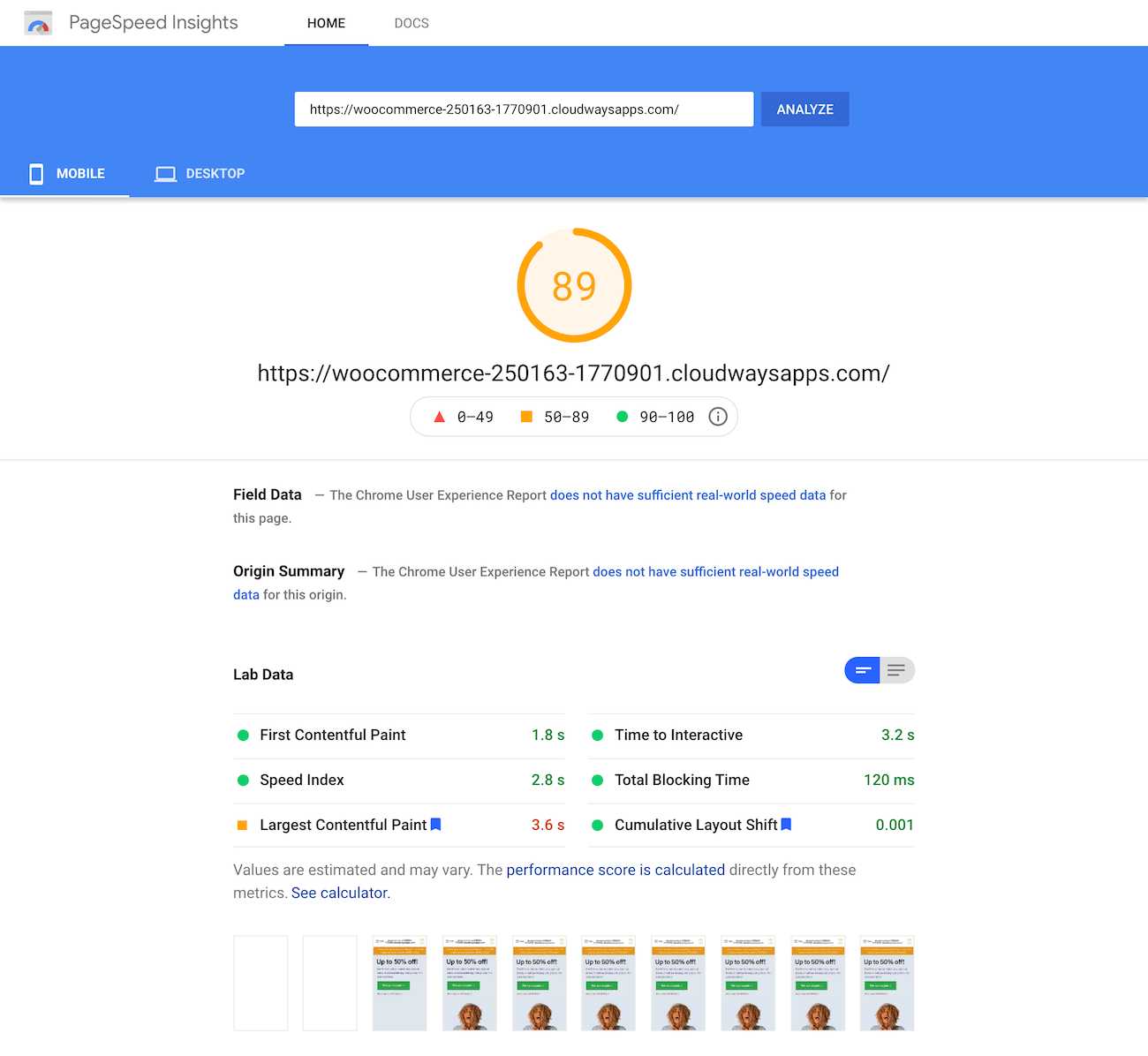
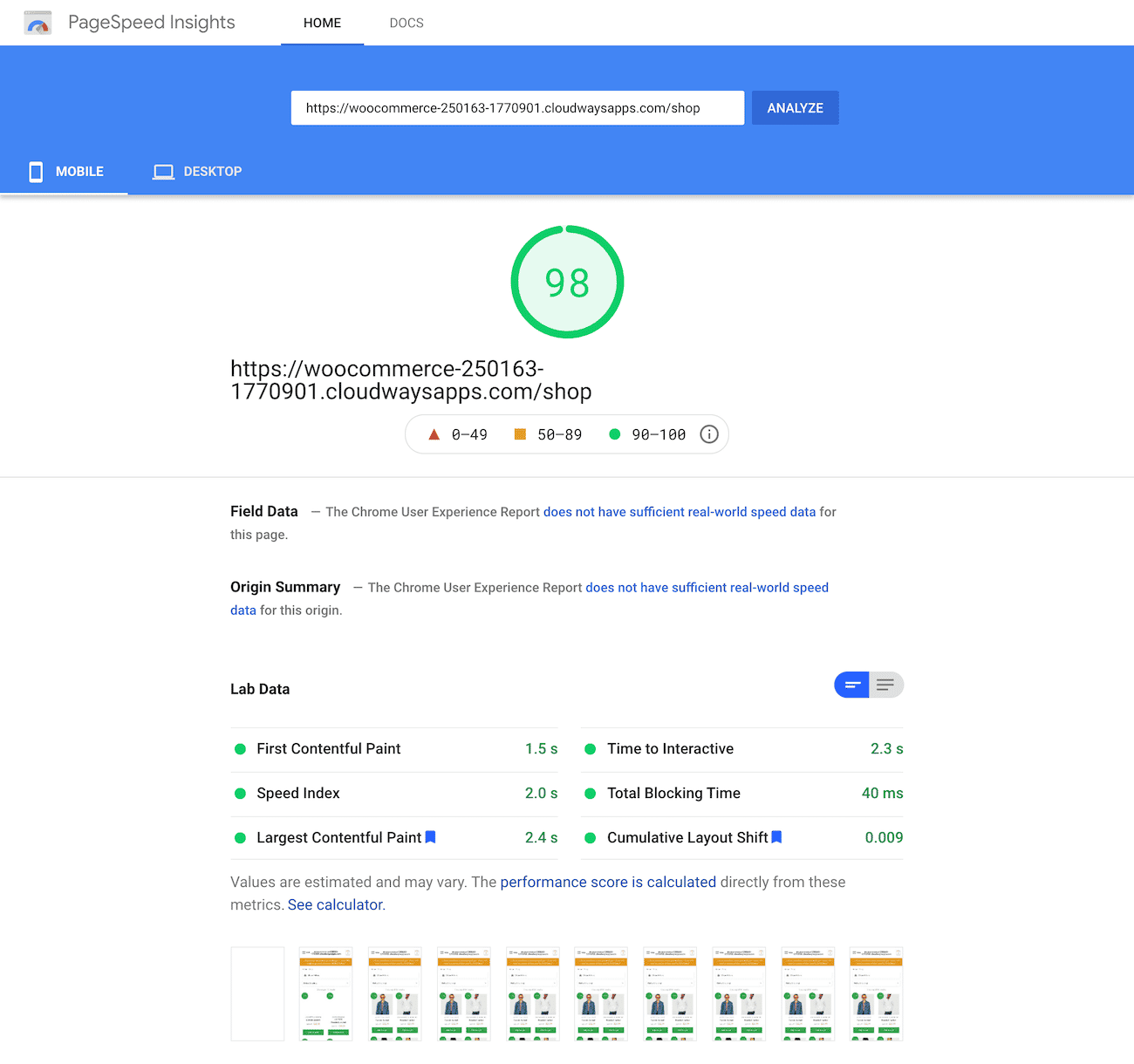
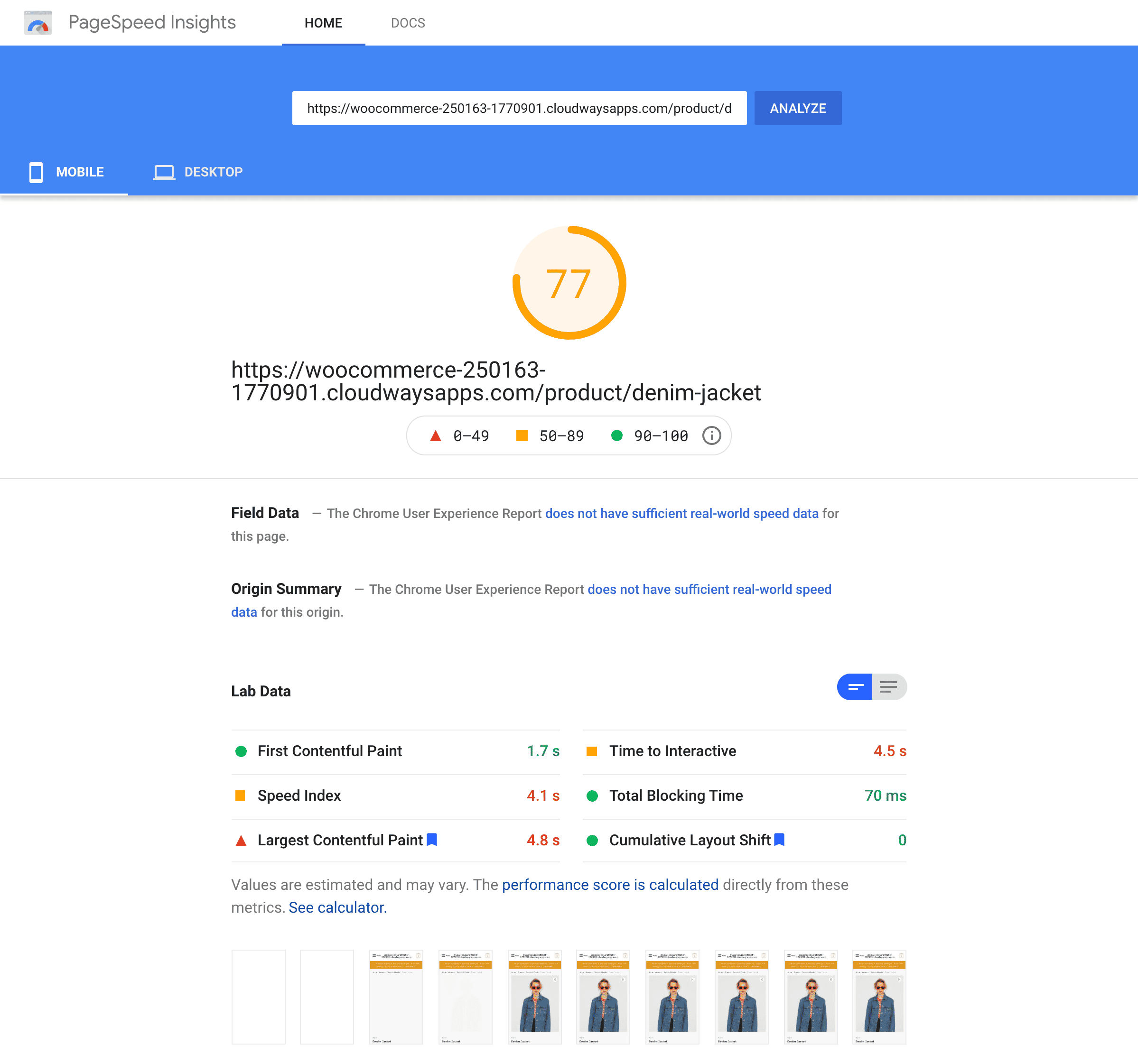
The homepage and shop page both scored 93 on mobile. The single product page came in at 78, dragged down by a 4.7s largest contentful paint — the large product image is the main culprit. CLS stayed at a perfect 0 on the homepage and shop page, with a small 0.106 shift on the product page. Our homepage capture recorded the score gauge only, so lab metrics aren’t shown for that page.
For reference, here are the PageSpeed Insights results from our original test run on the Shoptimizer store and the earlier Cloudways plan:
WebPageTest (Chrome, mobile)
| Metric | Homepage | Shop page | Single product |
| First Byte | 0.691s | 1.121s | 1.197s |
| Start Render | 2.5s | 1.7s | 1.9s |
| FCP | 2.49s | 1.721s | 1.927s |
| Speed Index | 2.664s | 1.866s | 2.589s |
| LCP | 2.709s | 1.922s | 1.927s |
| CLS | 0 | 0 | 0.003 |
| Document Complete | 2.922s | 1.891s | 3.058s |
| Fully Loaded | 3.722s | 3.092s | 3.895s |
| Requests (fully loaded) | 28 | 25 | 51 |
| Page size (fully loaded) | 1,558 KB | 1,255 KB | 2,276 KB |
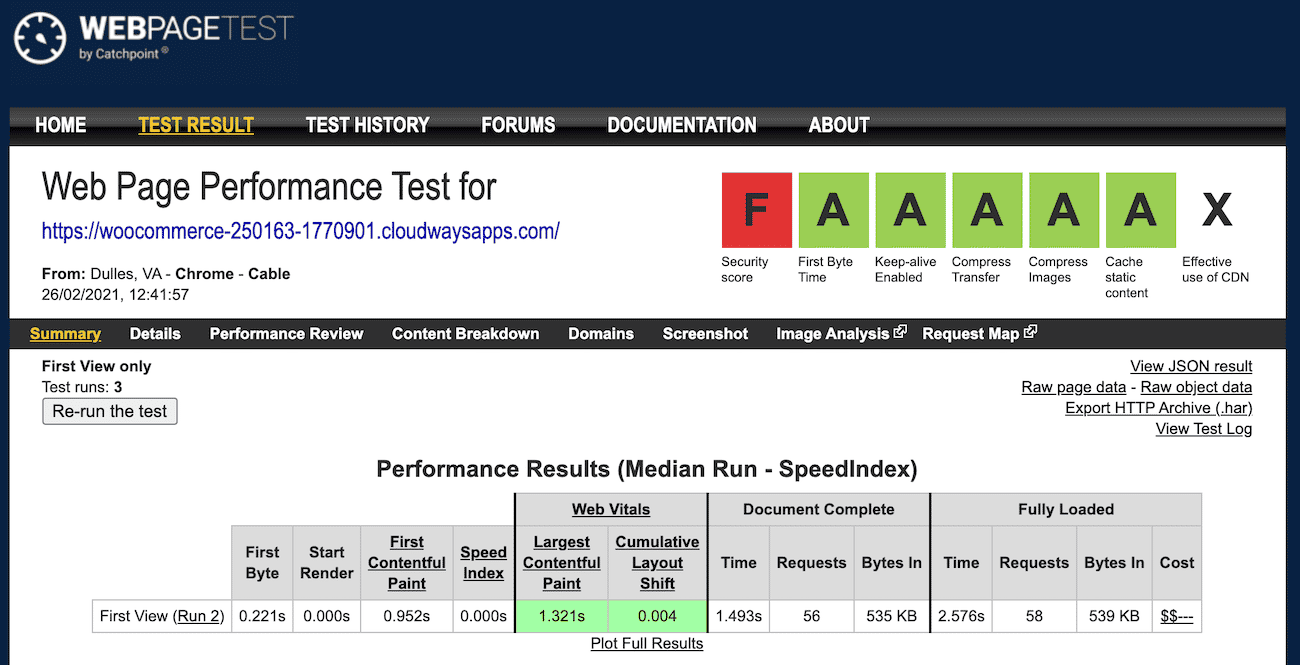
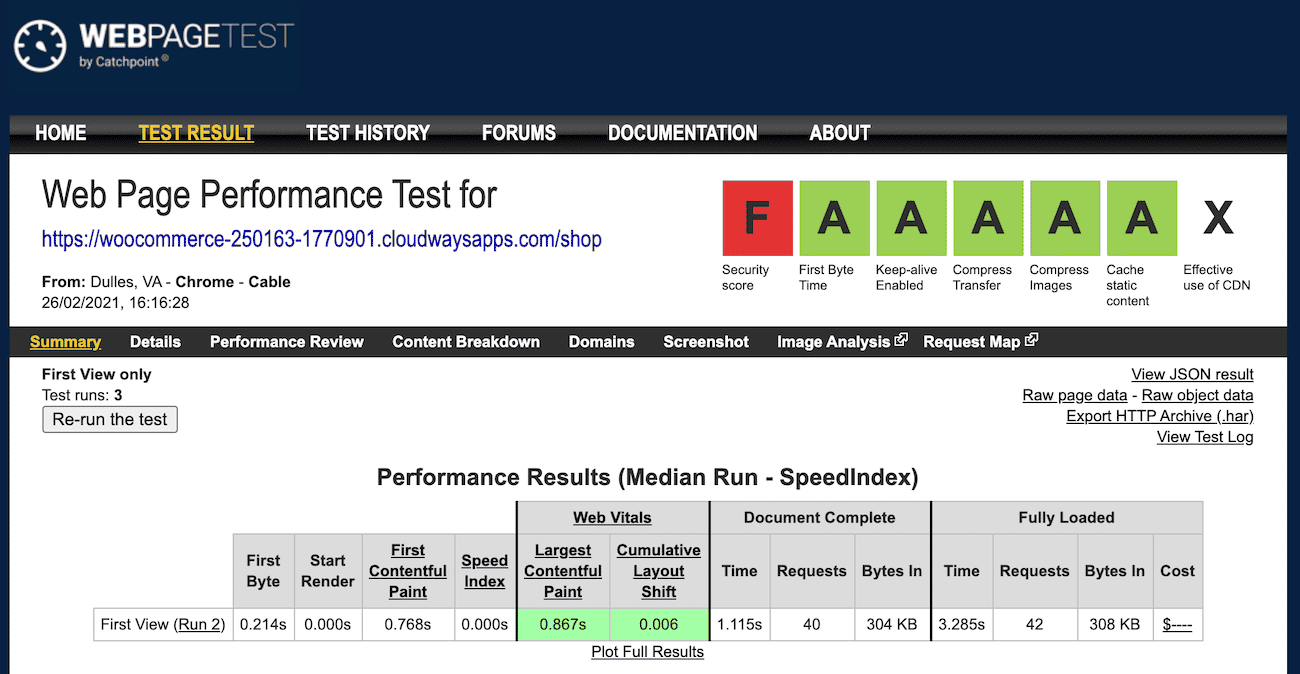
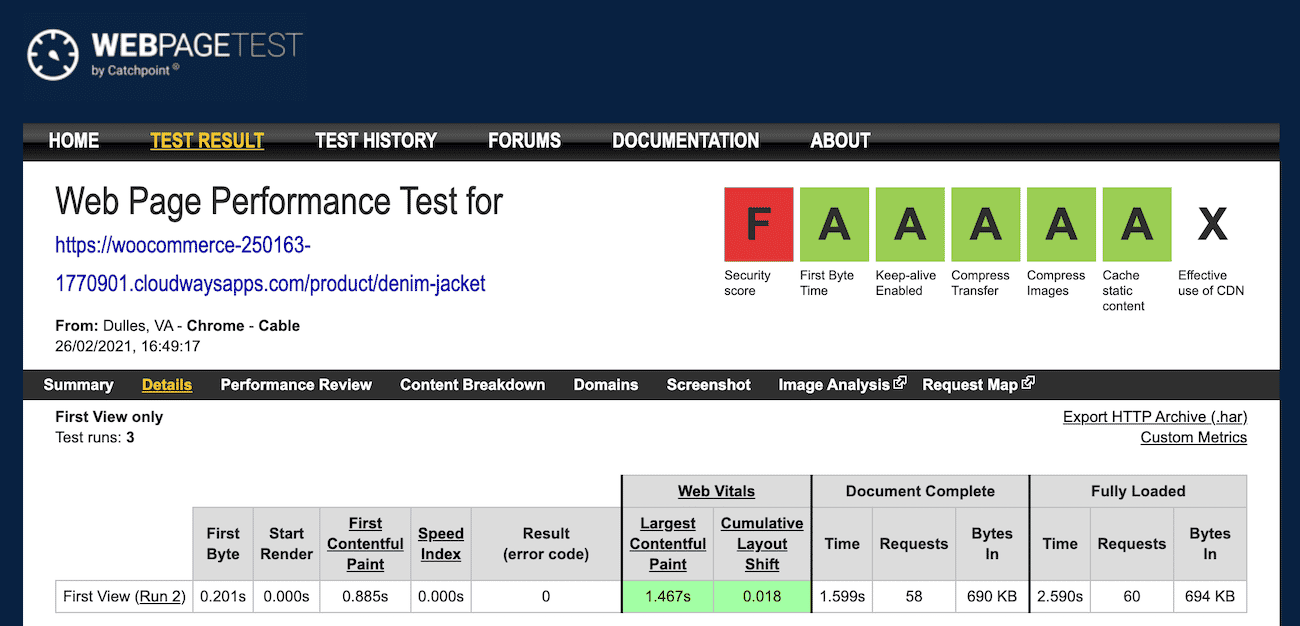
WebPageTest tells a similar story. First byte landed under 1.2s across all three pages, and fully loaded times ranged from 3.1s to 3.9s. The product page is the heaviest at 2,276 KB over 51 requests, roughly double the homepage and shop page. One thing worth calling out: WebPageTest measured a much lower LCP on the product page (1.927s) than PageSpeed Insights did (4.7s). PSI’s mobile test applies heavier CPU and network throttling, which is why the two don’t line up — the product image is still the element to optimise either way.
And the WebPageTest results from our original run, for comparison:
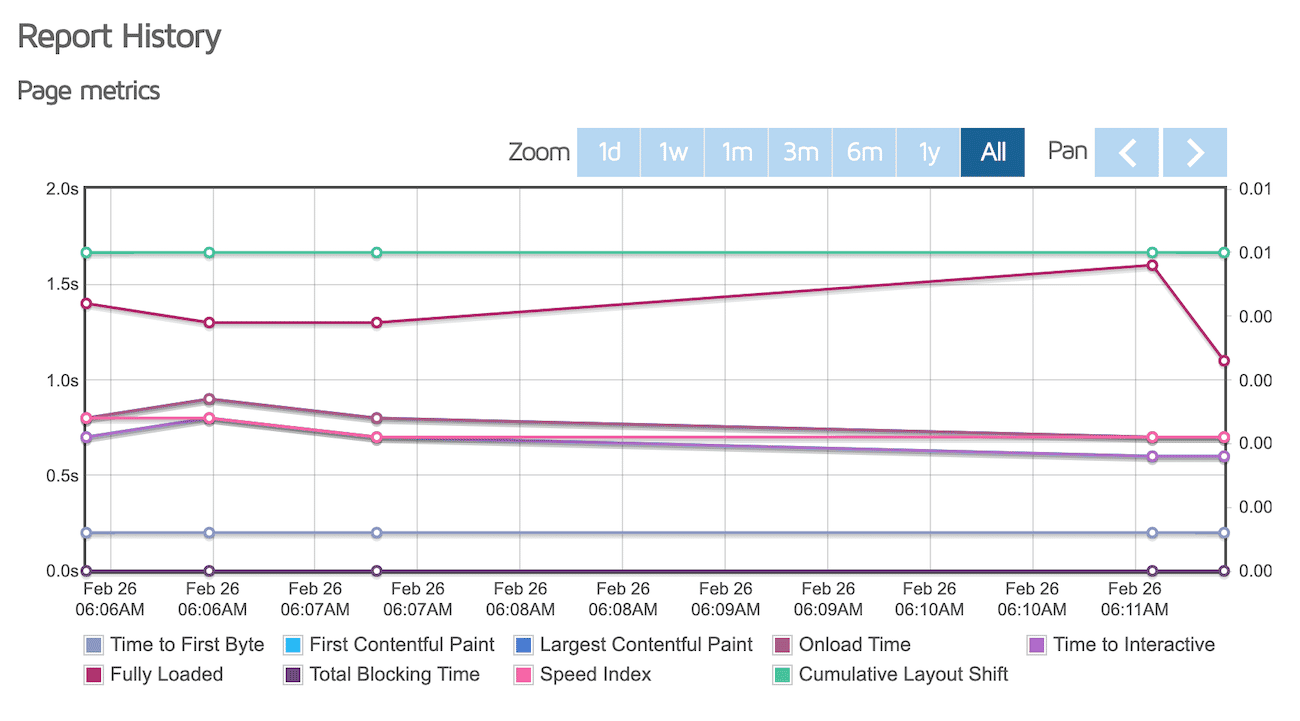
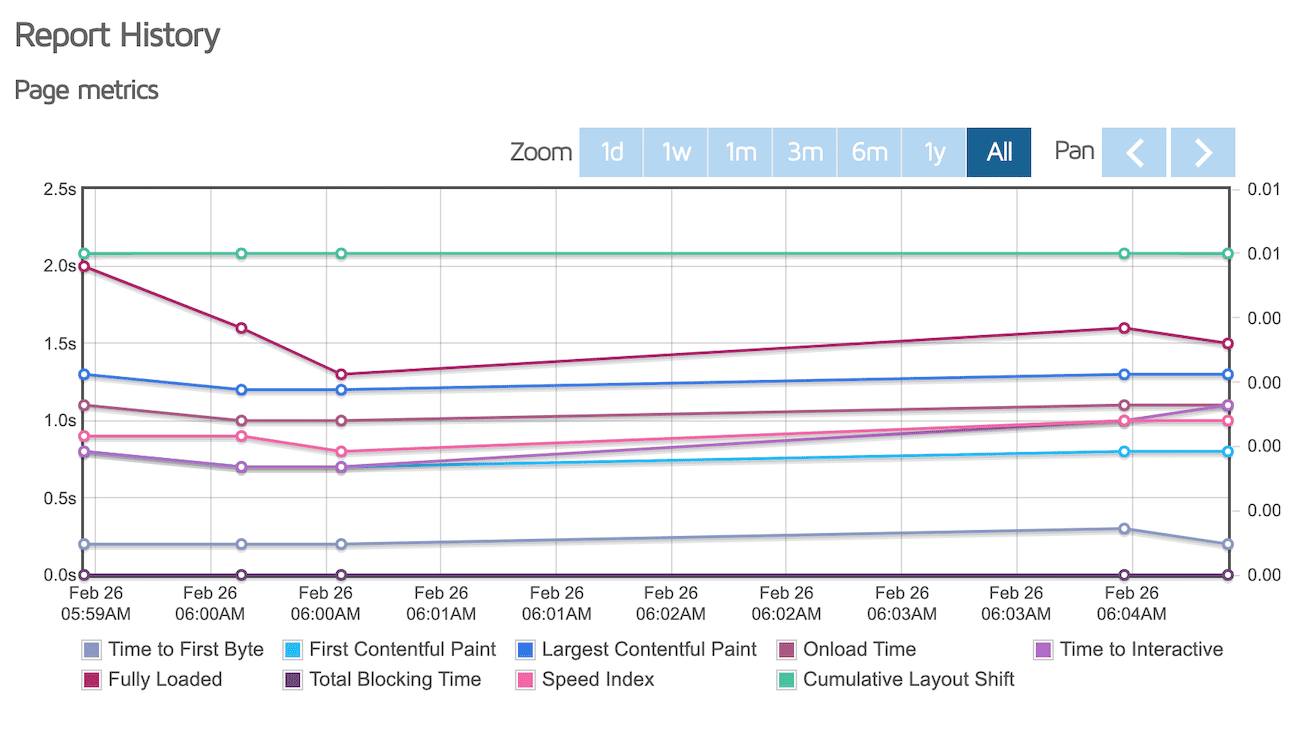
GTmetrix (original test run)
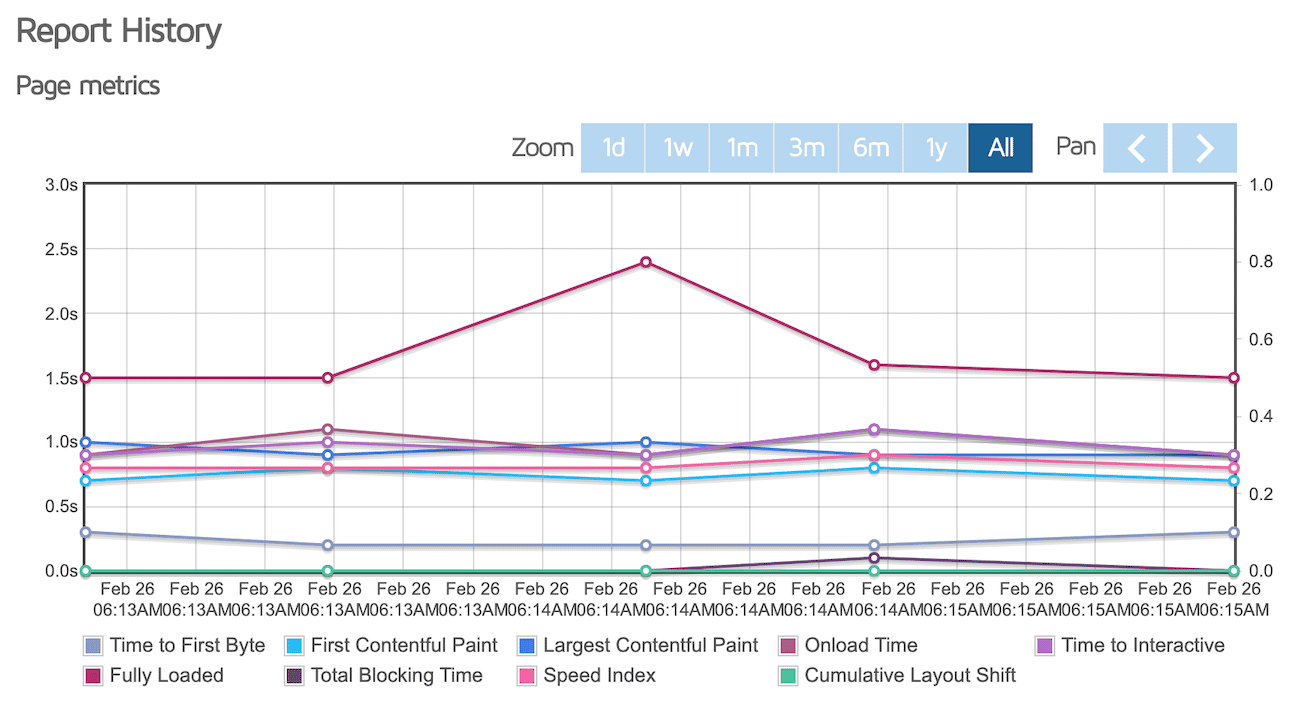
These GTmetrix graphs are from our original benchmark, with the test server location set to Vancouver, Canada. They’re included here for historical context — they predate the current test store and plan.
Plans and Pricing
Cloudways uses pay as you go pricing, so you only pay for the resources you consume, billed hourly, with no long term contracts. Pricing depends on the cloud provider and server size you choose.
Cloudways now offers two ways to host:
Cloudways Flexible
Flexible gives you full control over server size and cloud provider. Entry DigitalOcean Standard plans start at $11 per month for 1 GB RAM, 1 core, 25 GB storage, and 1 TB bandwidth, and scale up from there. Vultr and Linode are priced similarly, while AWS and Google Cloud start higher, at roughly $36 to $38 per month, for enterprise grade infrastructure.
Cloudways Autonomous
Autonomous is a fully managed, autoscaling WordPress and WooCommerce platform built on Kubernetes. It absorbs traffic spikes automatically and suits stores that expect flash sales or seasonal surges. Paid plans start at $99 per month, with higher tiers for larger stores.
Every Flexible plan includes free Let’s Encrypt SSL, automated backups, real time monitoring, unlimited applications, a built in firewall, free staging, and free AI Copilot credits. A Cloudflare Enterprise CDN add-on is available from $4.99 per domain per month, and it’s included with Autonomous.
A 3-day free trial is available on both Flexible and Autonomous, and you can sign up without a credit card.
Conclusion
Cloudways (affiliate link) managed cloud hosting offers high-performance web hosting at affordable rates. It’s perfect for online stores that are looking for a scalable hosting provider. You can choose which server to host your WooCommerce-powered store on and get set up in just a few minutes.
All you have to do is set up a WordPress website with WooCommerce, choose your server infrastructure, set the server size, and pick a location close to your target audience. With Cloudways, your store loads fast thanks to the NGINX based Lightning Stack, object caching with Redis, the free Breeze cache plugin, and an optional Cloudflare Enterprise CDN. Newer AI features like Cloudways Copilot also help you catch and fix server issues before they reach shoppers.
Start using the performance-optimized Shoptimizer theme on your online store today!





 WordPress Database/MySQL optimisation guide
 Adding Product Filters to WooCommerce
 WooCommerce Shortcodes – Tutorial and lots of examples
 Make your WooCommerce checkout process better with Stripe
Thank you Maria, that is interesting. It does beg the obvious question, how does this Cloudways plan compare to other hosts for performance (particularly Siteground, the shared hosting provider recommended elsewhere on this site)?
Hey Gareth, we’ll be comparing a number of popular hosts in this series. Our SiteGround review is live now 🙂